
Prerequisites
-
CAEVES instance must exist in Azure.
-
Recovery Services vault in the same region.
-
Azure VM Agent installed and running on the instance.
-
Sufficient permissions (Backup Contributor or Contributor).
-
Backup policy (default or custom) defined.
-
Network connectivity to Azure Backup endpoints.
Steps to Capture an Azure Backup of a CAEVES Instance
Step 1: Log in to the Azure Portal
- Open your browser and go to https://portal.azure.com
- Sign in with your Azure credentials.
Step 2: Navigate to the CAEVES Instance
-
Search for your instance name or select Virtual Machines.
-
Click on the CAEVES instance you want to back up.
Step 3: Open the Backup Blade
- In the VM’s left-hand menu, scroll down and select Backup under the Backup + disaster recovery section.
This opens the Backup management blade for the VM

Step 4: Select or Create a Recovery Services Vault
-
If no vault is configured:
-
Click + Create new.
-
Provide a name and select the same region as your VM.
-
Click Review + create → Create.
-
-
Select the vault and click OK.
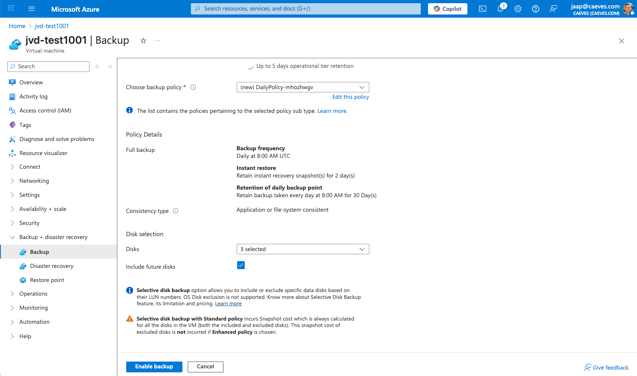
Step 5: Select or Create a Backup Policy
-
Choose an existing backup policy or click + New to create a custom policy.
-
Specify backup frequency and retention period.
-
Click OK to apply the policy.

Step 6: Enable Backup
-
Review the configuration (vault + policy).
-
Click Enable backup.
-
Azure installs the Backup extension inside the VM automatically.
-
Step 7: Trigger Initial Backup
-
After backup is enabled, click Backup now.
-
Select the retention period for this backup.
-
Confirm to start the backup job.
-
Monitor progress under View jobs until the backup status is Completed.

You have successfully captured an Azure Backup of your CAEVES instance. The backup is now stored in the selected Recovery Services vault according to the applied backup policy. You can monitor future backups and restore your instance as needed from the Azure portal.