
CAEVES Hybrid Cloud deployment requires a Service Principal (SPN) in the customer's Microsoft Entra ID tenant.
The SPN provides the application identity used by the CAEVES Hybrid Environment deployment to authenticate to the customer's Azure environment.
Before starting the CAEVES Hybrid Environment deployment, the required App Registration, Service Principal, and Client Secret must be created.
This article provides the following methods for creating the required application identity:
Method 1: Create the App Registration through the Azure Portal
Method 2: Create the App Registration using PowerShell and Bash scripts
Prerequisites
Before starting the CAEVES Hybrid Cloud deployment, ensure the following are available:
- Access to the customer's Azure subscription and Microsoft Entra ID tenant.
- Permission to create App Registrations and application credentials.
- An Azure account with Application Administrator, Cloud Application Administrator, or equivalent permissions.
- Azure CLI installed if using the Bash or PowerShell scripts.
Required SPN
A Service Principal (SPN) is a prerequisite for the CAEVES Hybrid Cloud deployment.
The following information must be available before starting the deployment:
| Parameter | Description |
| Tenant ID | Microsoft Entra Directory/Tenant ID |
| Client ID | Application (client) ID of the App Registration |
| Client Secret | Secret associated with the App Registration |
| Secret Expiry | Expiration date of the Client Secret |
When an application is registered in Microsoft Entra ID, a corresponding service principal is created in the tenant. The service principal represents the application identity in that tenant.
Method 1: Create the App Registration through the Azure Portal
Step 1: Open App Registrations
- Sign in to the Azure Portal.
- Navigate to Microsoft Entra ID.
- Select App registrations.
- Select New registration.
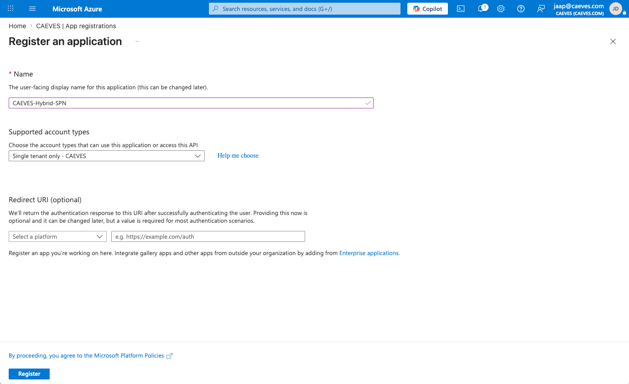
Step 2: Configure the App Registration
Enter the following details:
Name: e.g., CAEVES-Hybrid-Environment
Supported account types: Default (Single tenant)
Redirect URI: Leave blank unless required
Click Register.
Step 3: Record the Application IDs
After the App Registration is created, open the Overview page and record the following values:
- Application (client) ID
- Directory (tenant) ID
These values are required during the CAEVES Hybrid Environment deployment. 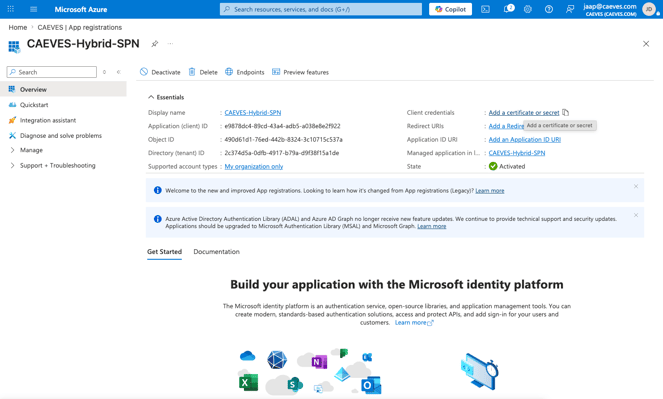
Step 4: Create the Client Secret
In the App Registration:
- Go to Certificates & secrets
- Select Client secrets
- Select New client secret
Enter the following:
Description: e.g., CAEVES-Hybrid-Environment
Expiration: 24 months
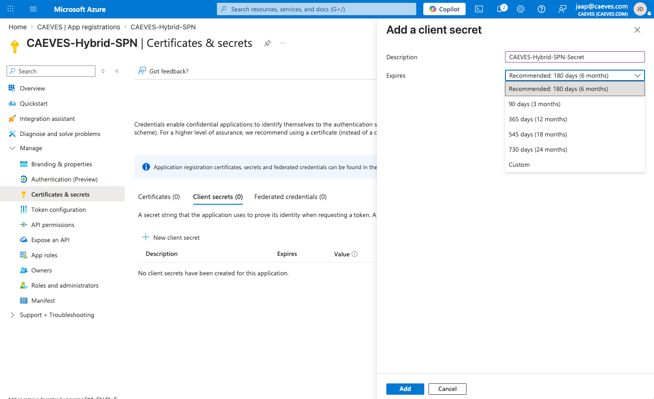
Click Add.
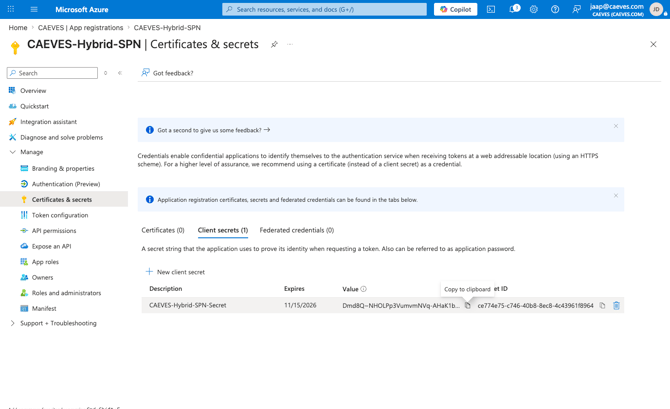
Important: The Client Secret value is displayed only when the secret is created. Make sure to copy and securely store the value before leaving the page.
Step 5: Verify the App Registration and SPN
Verify that the App Registration and its associated Service Principal are present in the customer's Microsoft Entra ID tenant.
The following information should now be available:
Tenant ID
Client ID
Client Secret
Client Secret expiry date
Method 2: Create the App Registration using PowerShell and Bash scripts
The App Registration, Service Principal, and Client Secret can also be created automatically using the provided Bash or PowerShell script.
Both scripts perform the same operation.
- Create an App Registration.
- Create a Service Principal for the App Registration.
- Create a Client Secret with a two-year expiration.
- Display the Tenant ID, Client ID, and Client Secret.
Note: Use either the Bash script or the PowerShell script.
Using Bash
Prerequisites
Before running the Bash script:
- Install Azure CLI.
- Sign in to the customer's Azure tenant: az login
- Verify the active Azure account and tenant: az account show
- Ensure your account has the required Microsoft Entra permissions.
Bash Script
Save the following script as: Register-CaevesHybridApp.sh
#!/usr/bin/env bash
#
# Register-CaevesHybridApp.sh
#
# Registers an Azure AD application in YOUR tenant and creates a client secret
# (valid for 2 years) so the CAEVES Hybrid Environment deployment can
# authenticate as this application. Run this in Azure Cloud Shell (or any
# shell with the Azure CLI installed and "az login" already done) BEFORE
# filling out the CAEVES Hybrid Environment Marketplace deployment wizard.
#
# Prerequisites:
#   - You must be signed in to the Azure CLI ("az login") against the tenant
#     where the Hybrid Environment will be deployed.
#   - Your account needs the "Application Administrator" (or higher, e.g.
#     "Cloud Application Administrator" / Global Administrator) Azure AD
#     role in that tenant to create app registrations and credentials.
#
# What this script does:
#   1. Creates an Azure AD app registration.
#   2. Creates a service principal for that app registration.
#   3. Creates a client secret on the app registration with a 2-year expiry.
#   4. Prints the Tenant ID, Client ID, and Client Secret for you to copy
#      into the CAEVES Hybrid Environment deployment wizard.
#
# This script does NOT assign any Azure RBAC roles or Microsoft Graph API
# permissions to the application - it only creates the identity and secret.

set -euo pipefail

APP_DISPLAY_NAME="${1:-CAEVES-Hybrid-Environment}"

echo "Checking Azure CLI login..."
TENANT_ID="$(az account show --query tenantId -o tsv)"
echo "Using tenant: ${TENANT_ID}"

echo "Creating app registration '${APP_DISPLAY_NAME}'..."
CLIENT_ID="$(az ad app create --display-name "${APP_DISPLAY_NAME}" --query appId -o tsv)"
echo "Created app registration with Client ID: ${CLIENT_ID}"

echo "Creating service principal for the app registration..."
az ad sp create --id "${CLIENT_ID}" >/dev/null

echo "Creating client secret (expires in 2 years)..."
SECRET_END_DATE="$(date -u -d '+2 years' +%Y-%m-%dT%H:%M:%SZ)"
CLIENT_SECRET="$(az ad app credential reset \
  --id "${CLIENT_ID}" \
  --append \
  --end-date "${SECRET_END_DATE}" \
  --query password -o tsv)"

echo ""
echo "=================================================================="
echo " Registration complete. Copy these values into the CAEVES Hybrid"
echo " Environment deployment wizard. The Client Secret is shown only"
echo " once - it cannot be retrieved again after you close this shell."
echo "=================================================================="
echo " Tenant ID:      ${TENANT_ID}"
echo " Client ID:       ${CLIENT_ID}"
echo " Client Secret:   ${CLIENT_SECRET}"
echo "=================================================================="
Run the Bash Script:
./Register-CaevesHybridApp.sh
The script displays:
Tenant ID
Client ID
Client Secret
Important: The Client Secret is displayed only once. Copy and securely store it immediately.
Using PowerShell
The PowerShell script performs the same operation as the Bash script.
Prerequisites
Before running the PowerShell script:
- Install Azure CLI.
- Open PowerShell.
- Sign in to the customer's Azure tenant: az login
- Verify the active Azure account and tenant: az account show
- Ensure your account has the required Microsoft Entra permissions.
PowerShell Script
Save the following script as: Register-CaevesHybridApp.ps1
# Register-CaevesHybridApp.ps1
#
# Registers an Azure AD application in YOUR tenant and creates a client secret
# (valid for 2 years) so the CAEVES Hybrid Environment deployment can
# authenticate as this application. Run this in Azure Cloud Shell, PowerShell
# mode (or any PowerShell session with the Azure CLI installed and "az login"
# already done) BEFORE filling out the CAEVES Hybrid Environment Marketplace
# deployment wizard.
#
# This is a PowerShell equivalent of Register-CaevesHybridApp.sh - same Azure
# CLI commands, same result. Use whichever shell you have available.
#
# Prerequisites:
#   - You must be signed in to the Azure CLI ("az login") against the tenant
#     where the Hybrid Environment will be deployed.
#   - Your account needs the "Application Administrator" (or higher, e.g.
#     "Cloud Application Administrator" / Global Administrator) Azure AD
#     role in that tenant to create app registrations and credentials.
#
# What this script does:
#   1. Creates an Azure AD app registration.
#   2. Creates a service principal for that app registration.
#   3. Creates a client secret on the app registration with a 2-year expiry.
#   4. Prints the Tenant ID, Client ID, and Client Secret for you to copy
#      into the CAEVES Hybrid Environment deployment wizard.
#
# This script does NOT assign any Azure RBAC roles or Microsoft Graph API
# permissions to the application - it only creates the identity and secret.

param(
    [string]$AppDisplayName = "CAEVES-Hybrid-Environment"
)

$ErrorActionPreference = "Stop"

function Invoke-AzCli {
    param([string]$Description)
    if ($LASTEXITCODE -ne 0) {
        throw "Failed: $Description (az exited with code $LASTEXITCODE)"
    }
}

Write-Host "Checking Azure CLI login..."
$TenantId = az account show --query tenantId -o tsv
Invoke-AzCli "az account show"
Write-Host "Using tenant: $TenantId"

Write-Host "Creating app registration '$AppDisplayName'..."
$ClientId = az ad app create --display-name $AppDisplayName --query appId -o tsv
Invoke-AzCli "az ad app create"
Write-Host "Created app registration with Client ID: $ClientId"

Write-Host "Creating service principal for the app registration..."
az ad sp create --id $ClientId | Out-Null
Invoke-AzCli "az ad sp create"

Write-Host "Creating client secret (expires in 2 years)..."
$SecretEndDate = (Get-Date).ToUniversalTime().AddYears(2).ToString("yyyy-MM-ddTHH:mm:ssZ")
$ClientSecret = az ad app credential reset `
    --id $ClientId `
    --append `
    --end-date $SecretEndDate `
    --query password -o tsv
Invoke-AzCli "az ad app credential reset"

Write-Host ""
Write-Host "=================================================================="
Write-Host " Registration complete. Copy these values into the CAEVES Hybrid"
Write-Host " Environment deployment wizard. The Client Secret is shown only"
Write-Host " once - it cannot be retrieved again after you close this shell."
Write-Host "=================================================================="
Write-Host " Tenant ID:      $TenantId"
Write-Host " Client ID:       $ClientId"
Write-Host " Client Secret:   $ClientSecret"
Write-Host "=================================================================="
Run the PowerShell Script:
.\Register-CaevesHybridApp.ps1
The script displays:
Tenant ID
Client ID
Client Secret
Important: The Client Secret is displayed only once. Copy and securely store it immediately.
Note: The Bash and PowerShell scripts create the App Registration, Service Principal, and Client Secret automatically. When using the Azure Portal, the App Registration and Client Secret are created manually.