
CAEVES supports automatic cache cleanup to ensure the cache volume does not fill completely. This is controlled through registry settings.
Registry Path
The automatic cache cleanup can also be controlled via registry keys located at:
HKEY_LOCAL_MACHINE\SOFTWARE\Caeves\GatewayConfig\FSConfig
Key Parameter:
CacheCleanerSchedulerFrequency
-
Defines how frequently the cache cleaner runs.
-
Value is in minutes. Example: 60 = 1 hour interval.
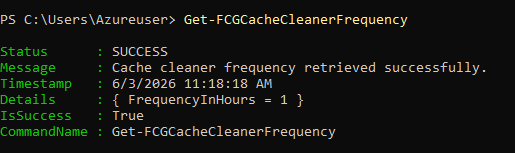
Verification:
Running the PowerShell command:
Get-FCGCacheCleanerFrequency
How Cache Cleanup Works
-
When the free space on the cache volume falls below the configured CacheMinFreeSpacePercent, the cache cleaner triggers automatically according to the interval set in CacheCleanerSchedulerFrequency.

-
This process removes unnecessary cache files to free space, preventing the cache volume from filling up completely.
-
The frequency and free space percentage can be tuned based on your environment’s storage capacity and performance requirements.